Greetings, Devil Dog! Welcome to the Call of Duty Forums. It looks like you're looking forward to Call of Duty: Modern Warfare 4, but haven't created an account yet. Why not take a minute to
 ricklender
Recruit
Hello everyone,
I am facing an issue with Modern Warfare 2 (2022).
I can find sth. on the internet about it, though, there seems to be no solution, yet.
First of all, my game is using every last bit of CPU power available.
Closing applications only makes room for more CPU power that the game instantly consumes.
NOTE: This only appears to happen when inside a match. In the menu, I am at about 40 % usage.
Secondly, the game randomly freezes and then crashes.
This also - but only sometimes - causes the whole computer to shut down and boot back up again.
--
EM after the crash:
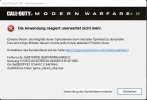
Error Code: 0x887A0005 (0x887A0006) (6068) D
Identifier: D103CD32-08795E4A-04A08218-B1AF1600
Location: 0x00007FFE11C5441C (13447484)
Exetutable File: game_steam_ship.exe
--
System Components:
Mainboard: Gigabyte Z390 Gaming X
PSU: Be Quiet! Straight Power 11, 650W
SSDs: Samsung 970 EVO Plus, 2 TB
CPU: Intel Core i7 9700k
Cooler: MSI CoreLiquid 360
RAM: Corsair Vengeance LPX, 32 GB (4 x 8 GB), 3200 MHz
GPU: GeForce RTX 3070 Ti
--
Temperatures are fine.
The game files have been checked through Steam with no issues.
Lowering the graphics settings does not change the CPU usage.
All drivers are up-to-date.
--
If anyone can help, I'd be very grateful - please refrain from "I have the same issue" comments.
I am facing an issue with Modern Warfare 2 (2022).
I can find sth. on the internet about it, though, there seems to be no solution, yet.
First of all, my game is using every last bit of CPU power available.
Closing applications only makes room for more CPU power that the game instantly consumes.
NOTE: This only appears to happen when inside a match. In the menu, I am at about 40 % usage.
Secondly, the game randomly freezes and then crashes.
This also - but only sometimes - causes the whole computer to shut down and boot back up again.
--
EM after the crash:
Error Code: 0x887A0005 (0x887A0006) (6068) D
Identifier: D103CD32-08795E4A-04A08218-B1AF1600
Location: 0x00007FFE11C5441C (13447484)
Exetutable File: game_steam_ship.exe
--
System Components:
Mainboard: Gigabyte Z390 Gaming X
PSU: Be Quiet! Straight Power 11, 650W
SSDs: Samsung 970 EVO Plus, 2 TB
CPU: Intel Core i7 9700k
Cooler: MSI CoreLiquid 360
RAM: Corsair Vengeance LPX, 32 GB (4 x 8 GB), 3200 MHz
GPU: GeForce RTX 3070 Ti
--
Temperatures are fine.
The game files have been checked through Steam with no issues.
Lowering the graphics settings does not change the CPU usage.
All drivers are up-to-date.
--
If anyone can help, I'd be very grateful - please refrain from "I have the same issue" comments.