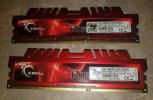
Now, I don't want to class myself as an expert on RAM, I am basing all this on what I can remember from videos by Gamers Nexus and Hardware Unboxed, but I will give an answer based on what I have understood from these.
So, first tt depends on how you are doing it.
RAM modules are designed to run over 2 channels for best results, so 2 sticks of 8GB with 1 on channel A and the other on channel B will perform better than 2 stick on the same channel.
RAM modules can have the RAM soldered onto 1 side of the PCB, these are known as single rank modules, or have chips on both sides so they are dual rank modules, from what I have found it looks like single rank is faster as data has to travel farther as it is to access both sides of the PCB, which slows access speeds down but dual rank can increase memory bandwidth by upto 0.5%, so that means once the data is accessed, it is typically moving an incie-wincie bit faster.
Dual channel, on the other hand moves a lot faster, it works at upto double the transfer rate of single channel memory, but it will still be limited by other factors such as how fast data moves from your drives, through the sata channels, and then into the RAM before the CPU can call on it.
It used to be that people would say 2x 16GB in dual channel with single ranked modules gives the best performance, but it is looking a lot like 4x8GB would deliver better performance now. Each channel would treat the 2 modules as if they were a single module of dual ranked RAM, but because each module is actually single ranked, data only has to travel once over a single side of the PCB instead of twice over a dual ranked module, which increases latency in dual ranked modules.
Matched modules such as 4x8GB would perform better than unmatched RAM, matching in RAM is not just the amount of RAM on each module, it is also making sure that the RAM is made by the same people. Users have reported that 4 sticks of RAM running all Samsung, or all SK Hynix, Micron, etc... will run with no stability issue, while mixing brands of chips can seriously affect stability.
Buy your RAM in packs of 2 if you plan on running 2x8gb or 4 if you want to run 32GB.
I think 24GB would be a bad idea, unless you can get 4x6GB, the only way I can think of to get 24GB is with 2x4GB + 2x8GB and that's not matching, but this is the part that I am most confused about, so I might have that wrong, or it might be that modern parts aren't as handicapped by this as older parts were.


 Greetings, Devil Dog! Welcome to the Call of Duty Forums. It looks like you're looking forward to Call of Duty: Modern Warfare 4, but haven't created an account yet. Why not take a minute to register for your own free account now? As a member you get free access to all of our forums and posts plus the ability to post your own messages, communicate directly with other members and much more.