• Greetings, Devil Dog! Welcome to the Call of Duty Forums. It looks like you're looking forward to Call of Duty: Modern Warfare 4, but haven't created an account yet. Why not take a minute to register for your own free account now? As a member you get free access to all of our forums and posts plus the ability to post your own messages, communicate directly with other members and much more.

Beginning To Build 10Gen Gamer

AntiCheatAgent94

The Equalizer
OK, so now I have to bring my MB/CPU/RAM specs to match my video card...

I am looking at the 10th GEN because 12th is a bit out of my price range

Here's where I am starting:
 
The Intel 10th gen CPUs are a really viable choice for a great upgrade path, most of the YouTube channels I follow tend to see the 11th gen as a let-down due to the newer chips' regression in terms of overall performance. So why buy 11th gen when 10th does it better? right?

The sweet spot for price vs performance with the 10th gen is with the i5, the 10600k for the lower price point or the i7 10700k for around a 28% increase in price, with the overall best 10th gen Processor being the i9 10900k which costs 32% more than the 10700k and 70% more than the 10600k.

Use this video to look at how the Intel processors stacked up against the AMD processors in March 2021.


I found these comparisons of the i5, i7, and i9, that you might find helpful too.

i5 vs i7
i5 vs i9
i7 vs i9

You can switch CPUs in those comparisons to see AMD Ryzen vs Intel results too, but I would not buy a Ryzen CPU right now as the newer Ryzen chips with the 3d V-Cache are expected to launch shortly after the holiday season.
 
OK, I am at a junction in my pursuit of a higher end gamer..

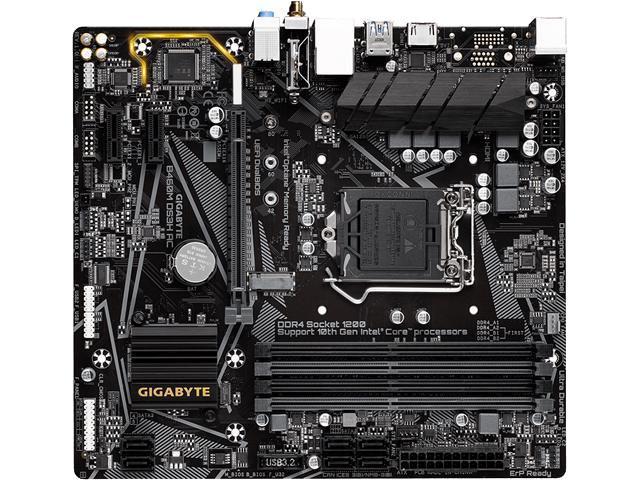
I found a guy who will trade me this...

GigaByte B365M DS3H with a Intel(R) Core(TM) i5-9400F CPU @ 2.90GHz0 24GB DDR4

... for my Core i7 setup.

So I can get up and running with a higher end gamer with no $$$...

OR....

Or I can go thru my RTO company where I got the RTX from and add about $40 a week (total of 80 or so) for this....

10th Generation Intel® Core™ i5-10400 processor

.... but I'll be paying on it for over a year...

Unless the RTO one is way way WAY better than the GigaByte setup, I am leaning towards just doing the swap and not putting myself in debt any more...
 
I haven't looked at the RTO option, so I'm answering blindly, but I would still go for the 'free' trade in, clear some of the finance on the 3060Ti then look at a more up to date solution later.
 
I haven't looked at the RTO option, so I'm answering blindly, but I would still go for the 'free' trade in, clear some of the finance on the 3060Ti then look at a more up to date solution later.
Yea, that's my thinking as well... There doesn't seem to be much advantage to doubling my weekly payment for a few extra mhz.. Happy wife makes for a happy life.. :D


I can always upgrade the CPU later.. And 8GB vs 24GB is a big draw too...
 
OK.. I am up with the Core i5 10th Gen.. Right off the bat, just my web surfing is a lot faster.. Quicker refreshes et al...

Gonna load up Warzone and see.. :D
 
Well, this is really a kick in the ass!!

Got my new MB installed.. Loaded up a game with Settings set for Highest Graphics...

Got around 50-60 FPS... :(

Changed the settings to Highest Performance...

No different... Got around 50-60 FPS...

What amazes me is that there is very little to no change between MAX GFX and MAX Performance...

I am beginning to think maybe my RTX card is bad???

One possibility is that I simply pulled my Win10 Boot drive from the old MB and loaded it up on the new MB... Is it possible I need a fresh install?? Would that make such a difference??

I just ran some quick tests cuz my evenings belong to my lovely wife.. :D

So, I'll get on first thing in the AM and fiddle...

As always, the assistance and hints and help is greatly appreciated...
 
It is possible to move a Windows boot drive from one PC to another, but you do need to update all motherboard drivers, reinstall all graphics drivers, maybe even wipe old drivers with DDU.

In my opinion, it is better to go through the pain of a fresh install then it is to troubleshoot an old installation where you could be bringing legacy issues from your old PC to the new build.

Before wiping your old installation, copy all your CoD folders to a spare drive, then reformat the drive during your fresh install, install Battlenet, copy CoD folders to the drive and locate games to save having to download them again.
 
ill say this, you can go to you tube and type in search your hardware and can see what to expect. heres an example but i dont see the resolution he,s playing in.

View: https://www.youtube.com/watch?v=I390fBIov_U
That video was at 1440p with RTX on running a 3060Ti and a 9400F. It shows 1440 in the thumbnail.

Frame rates look good at a minimum of 80 and hovering mostly around 100 at the start but dropping to 80+ later on.
 
OK I have a fresh install (Win 11) on a mb mounted 256GB SSD drive..

Updated my BattleNet, my NVIDIA Drivers for the RTX 3060ti and everything I can think of..

I run my settings, per GEFORCE Experience, straight down the middle.. Mid way point between performance and graphics...

I am still topping out at only 60ish FPS...

This is REALLY getting frustrating....
 
Played a round in Safe Mode.. Didn't budge my FPS a bit.. 60s with some occasional 70s..

Is there a benchmark program I can run in the background that will record what the stats of my various hardware as I am playing are doing???

Seems to be the only way I can tie down exactly where my bottleneck is coming from...
 
you have to remember that lower the settings the more fps so if your running middle of the road then your probably getting what you should. i have a 2080ti xc ultra and if i max out settings my fps drops quite a bit especially if ray tracing is on. so in geforce exp i slide the bar to performance and then in settings i look at vram meter and the lower that is the more fps you get so if you make an adjustment you can see if it moves or not.
 
Is there a benchmark program I can run in the background that will record what the stats of my various hardware as I am playing are doing???
MSI Afterburner can monitor and record stats on all aspects of DirectX performance, from FPS, frame render times, GPU + CPU temps and so much more. It can even graph the output and record highs, 1% lows and average in all those areas. A PITA to set up, but once done it is so useful, look for a YouTube guide on how to get it working.
 
you have to remember that lower the settings the more fps so if your running middle of the road then your probably getting what you should. i have a 2080ti xc ultra and if i max out settings my fps drops quite a bit especially if ray tracing is on. so in geforce exp i slide the bar to performance and then in settings i look at vram meter and the lower that is the more fps you get so if you make an adjustment you can see if it moves or not.

That's what is stumping me..

I set me setting to rock bottom GFX and MAX performance.. Or rock bottom performance and MAX GFX....

Regardless of the settings, my FPS is the same.. +/- 10 points or so...

No matter the adjustment, my FPS change is negligible...

That's mind boggling...

That's what makes me think the actual hardware of the card is bad.. Because I don't see FPS much better than my GTX970...
 
MSI Afterburner can monitor and record stats on all aspects of DirectX performance, from FPS, frame render times, GPU + CPU temps and so much more. It can even graph the output and record highs, 1% lows and average in all those areas. A PITA to set up, but once done it is so useful, look for a YouTube guide on how to get it working.


I'll check it out.. Bummed after another JAGS loss (AGAIN).. It's so damned hard to be a JAGS fan.. heh

I'll probably check it out in the AM...
 

Like CODForums!

Advertisements

Back
Top