• Greetings, Devil Dog! Welcome to the Call of Duty Forums. It looks like you're looking forward to Call of Duty: Modern Warfare 4, but haven't created an account yet. Why not take a minute to register for your own free account now? As a member you get free access to all of our forums and posts plus the ability to post your own messages, communicate directly with other members and much more.

Constant Crashing On PC

Status
Not open for further replies.
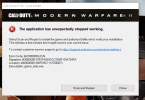
So ever since the season 2 update I can no longer load call of duty. I've noticed it's every time the message of the day goes to load, bang. Crash. Here's the error:
Error Code: 0xC0000005 (0) N

Signature: 0DB65558E-0761FA290-ECC3356F-83A734FA

Location: 0x00000001456FD9C7 (13758007)

Executable: game_ship.exe

I've literally tried everything. Reinstalling battle.net, reinstalling COD, uninstalling display drivers with DDU then reinstalling the latest drivers, resetting my bios settings, clearing caches, EVERYTHING. I'm so angry with this game right now, if someone has any input please. Thank you

 
Infinity Ward has officially acknowledged the issue and is investigating it. Although, an official ETA for the bug fix has not been provided.

It has been reported and it happens on some consoles too. I would imagine that you will see a hotfix real soon.
 
how bout they just simply need to remove the season 2 cinematic and pc users will be able to launch just fine..most from what i read was ppl not being able to get pass the season 2 cinematic...give us a workaround at least til theres an official patch to just disable it or remove it cus you cant even get to menus and editing the settings/config files to disable cinematics doesn't fix it either.
 
Ive heard that some people have done their own Quick Fix /Workaround by simply uninstalling the campaign. I have not done this as I dont need to since mine is working fine. I just offer this up as is.
 
Exact same issue. I got past the intro cinematic by clicking "cancel" as soon as the message for "updating playlists" appears and waiting about 20 seconds before clicking "retry" and this usually successfully gets me to the menus. However, the game still crashes the instant I click "Start" to find a multiplayer match, every. single. time. Still gives the exact same error message. Ive also tried every fix I can find on the internet, and nothing works as of yet.
 

Attachments

  • Cod MW2 crash.PNG
    Cod MW2 crash.PNG
    171.8 KB · Views: 1
i fixed mine by renaming my Documents/call of duty folder or just delete it and restart battlenet ...keep in mind if you do this, you will lose all your settings and keybinds...you can save your keybinds if you save the C:\Users\fjkdlasjlkfds\Documents\Call of Duty-old\players\##########\keybinds.kb but if it still doesnt work after deleting the folder but you saved your keybinds just mmake a copy of keybinds and move it elsewhere and delete said above folder again.
 
Status
Not open for further replies.

Like CODForums!

Advertisements

Back
Top